Best Free AI Tools 2026: I Tested 20+ Tools — Here Are the 7 That Actually Made My Work Easier
By Ashirbad ••Tech & AI• 107 views
Advertisement
Best Free AI Tools 2026: I Tested 20+ Tools — Here Are the 7 That Actually Made My Work Easier
AI stopped being a novelty a while ago. It's just part of the workday now. Students lean on it for research and revision, developers run it alongside their editor, designers use it to knock out a first draft of a graphic in seconds, and businesses use it for everything from writing to reporting.
Which is exactly the problem. Type "best free AI tools 2026" into Google and you'll get hundreds of listicles, most of them recycling the same ten names in a different order. A long list doesn't tell you which tools are worth your time.
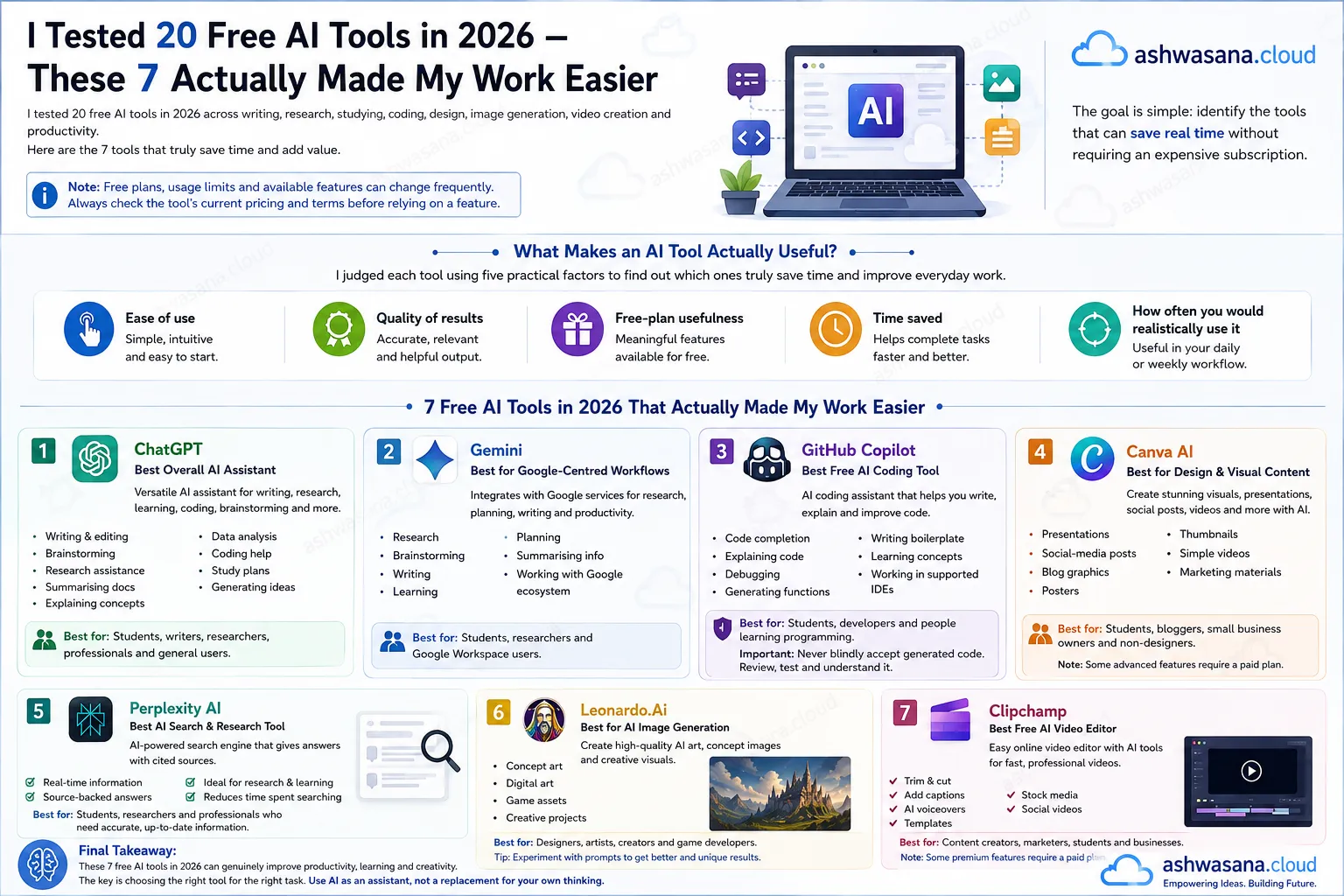
So instead of another "top 10 free AI tools in 2026" roundup, this is a working guide — built around actual use cases: writing, research, studying, coding, design, video, and everyday productivity. I tested more than 20 tools over the last few months. Seven of them earned a permanent spot in my browser tabs. Here's what made the cut, what didn't, and why.
A quick note before you dive in: free plans, usage caps, and included features change constantly — sometimes month to month. Everything below was checked against current pricing pages, but always double-check a tool's live terms before you build a workflow around a "free" feature.
What Actually Makes an AI Tool Worth Using?
A long feature list doesn't make a tool useful. I judged everything here on five things:
- Ease of use — can you get a result in the first five minutes?
- Quality of output — is it something you'd actually ship, or does it need a full rewrite?
- How much the free plan really gives you — versus what's locked behind a paywall
- Time saved — the whole point of using AI in the first place
- Whether you'd realistically reach for it again tomorrow
A tool that produces one brilliant result and then gets abandoned is less valuable than a boring tool that quietly saves you twenty minutes every single morning. That's the lens for everything below.
1. ChatGPT — Best Overall Free AI Assistant
ChatGPT is still the default answer to "what's the best free AI tool" for most people, and for good reason — it's the most versatile thing on this list.
The free tier gives you access to GPT-5.5 Instant with a rolling message cap that resets every few hours, and it quietly downgrades you to a lighter model once you hit that limit rather than cutting you off entirely. The newest flagship models sit behind the paid plans, though free users can still tap into a mid-tier model through the coding-focused Codex mode. One change worth knowing about: free U.S. accounts started seeing ads on some answers earlier this year, so don't be surprised if you spot one.
Good for: writing and editing, brainstorming, research assistance, summarizing long documents, explaining concepts you're stuck on, basic data analysis, coding help, study plans, and general idea generation.
Best for: students, writers, researchers, and anyone who wants one tool that does a bit of everything.
The catch: confident doesn't mean correct. Treat anything financial, legal, medical, or time-sensitive as a starting point that needs verification, not a final answer.
2. Gemini — Best for Google-Centered Workflows
If your life already runs through Gmail, Docs, and Calendar, Gemini is the more convenient pick simply because of where it lives.
Google's current rollout of Gemini 3 pushes deeper integration across Calendar, Notes, Tasks, Google Photos, YouTube, and Maps, and Google has been widening free access to more advanced features like Gems for users who aren't paying for Workspace add-ons.
Good for: research, brainstorming, writing, studying, planning, summarizing, and anything that touches your existing Google files.
Best for: students and professionals already living inside the Google ecosystem.
3. GitHub Copilot Free — Best Free AI Coding Tool
If you're searching for the best free AI coding tools of 2026, Copilot's free tier is still the most practical starting point for most developers.
GitHub gives individual developers 2,000 code completions and 50 chat requests a month on the free plan, with model selection handled automatically rather than left to you. GitHub switched everything to a credit-based billing system in June 2026, but the free tier's monthly allowance didn't change — it's the same deal it's been for a while, just measured differently under the hood. Verified students get a separate, more generous Copilot Student plan through the GitHub Student Developer Pack.
Good for: code completion, explaining unfamiliar code, debugging, writing boilerplate, learning new languages, and working directly inside your editor instead of copy-pasting into a separate chat window.
Best for: students, working developers, and anyone learning to code.
Fair warning: never accept generated code blind. Read it, test it, and understand what it's doing — especially anywhere near authentication, payments, or anything touching a database.
4. Canva AI (Magic Studio) — Best for Simple Design and Visual Content
Not every project needs professional design software, and Canva's Magic Studio is still the easiest way to turn an idea into something presentable without any design background.
Magic Studio bundles AI writing, image generation, and video generation into one suite. Some features are free, others sit behind Canva's paid plan, but the free tier covers a surprising amount of everyday design work.
Good for: presentations, social posts, blog graphics, posters, thumbnails, short videos, and marketing materials.
Best for: students, bloggers, small businesses, and anyone who needs something that looks good without hiring a designer.
5. AI Video Tools — Useful, But Read the Fine Print on Free Limits
AI video generation has gotten dramatically more accessible, but it's also the category where "free" is most likely to disappoint you if you don't check the details first.
Canva's Magic Media, for example, folds AI video generation right into the same design suite, though exactly what's included on the free tier shifts from time to time. Before you commit to any tool for a real project, check:
- How many generations does the free plan actually include?
- Does the output carry a watermark?
- What resolution do you get?
- Can you use the result commercially?
- How long does a single generation take?
- Can you actually edit the result afterward, or is it locked?
A free video tool can be excellent for messing around and testing ideas while still being completely unsuitable for producing content at scale.
6. AI Writing and Research Tools
The writing tools that actually help are the ones you treat as an assistant, not an autopilot.
They're genuinely useful for outlining, brainstorming, rewriting, grammar cleanup, summarizing, generating questions you hadn't thought to ask, and turning a pile of scattered notes into a structured first draft.
The workflow that actually produces good writing looks like this:
Research → think → draft → AI assistance → fact-check → human editing
Not this:
Prompt → copy → publish
AI can speed up the mechanical parts of writing. It can't replace original analysis, real examples, or editorial judgment — and content that skips those tends to read exactly like it skipped them.
7. AI Image Generation Tools
Image generators are most useful for people who need a visual concept fast and don't have advanced design skills to fall back on.
They're solid for blog illustrations, concept art, social graphics, backgrounds, and presentation visuals. Just don't assume an AI-generated image is automatically fine for every commercial use — check the provider's current terms on ownership and commercial rights before you publish anything built on one.
Best Free AI Tools for Students in 2026
Students probably get the most value out of this whole category, because the free tiers cover most of what a semester actually requires.
| Understanding a concept | AI chatbot |
| Research | AI search / research assistant |
| Coding | AI coding assistant |
| Presentations | AI design tool |
| Writing | AI writing assistant |
| Revision | AI tutor |
| Brainstorming | General AI assistant |
| Data analysis | AI analysis tool |
The point isn't to let AI do the work — it's to let AI support the learning. Instead of asking a chatbot to "give me the answer," try:
"Explain this concept at three difficulty levels, then give me five questions to check if I actually understand it."
That single change turns a chatbot from an answer machine into something closer to a tutor.
Best Free AI Coding Tools 2026
For developers, a genuinely useful free toolkit usually combines three things:
An AI chatbot — for explaining errors, sketching out solutions, learning new concepts, and reviewing small snippets.
An AI coding assistant — GitHub Copilot Free remains the most practical entry point, with its 2,000 monthly completions covering a lot of day-to-day coding for a light user.
The traditional stack you still need anyway — Git, GitHub, a real code editor, documentation, and proper testing and debugging tools. AI assistance is one layer on top of software engineering, not a replacement for it. The developers who benefit most are the ones who combine both.
Best Free AI Video Tools 2026: What Should You Actually Look For?
Stop asking "which AI video generator is best" and start asking "which tool fits the video I actually need to make." The right pick depends heavily on who you are:
YouTube creator: needs longer editing tools and real storytelling capability. Instagram or TikTok creator: needs fast, vertical-first generation. Business: needs brand consistency and reusable templates. Student: needs simple, fast explainer and presentation videos. Marketer: needs to spin up multiple versions of the same content quickly.
There isn't one universal "best" free AI video tool — there's a best tool for your specific job.
What Is the Best Free Alternative to Adobe Illustrator?
This is one of the most searched questions from anyone who needs vector graphics without an Adobe subscription — and it comes up constantly, so let's be precise about it.
Is there any free version of Adobe Illustrator? No. Adobe Illustrator itself is paid software, full stop. Adobe currently offers a 7-day free trial with full functionality, and you'll need to enter payment details to start it — it converts to a paid subscription automatically if you don't cancel first.
If you need something that's actually free long-term, look at a dedicated vector editor that covers what you'll really use:
- SVG editing
- Vector shapes and pen tools
- Layers
- Typography controls
- Proper export options
- Boolean operations (combining and cutting shapes)
Inkscape is the closest thing to a full free replacement — open-source, desktop-based, and capable enough that plenty of designers use it instead of Illustrator by choice. For lighter, browser-based work, tools like Vectr, Boxy SVG, or Photopea cover quick edits without an install. Canva is worth mentioning too, but it isn't a vector editor in the same sense — fine for social graphics, not built for precision illustration work.
Free Alternatives to Adobe Illustrator, by What You're Actually Doing
| Social media graphics | Canva |
| Presentations | Canva |
| Simple marketing graphics | Canva |
| Professional vector illustration | Inkscape or another dedicated vector editor |
| Logo concepts | Inkscape or Canva |
| Advanced print design | Professional vector software |
If you come across a site promising a "free full version" of Illustrator outside Adobe's own trial, that's a red flag — download software only from sources you trust.
What Is the Best Free Alternative to AutoCAD?
AutoCAD and AI tools aren't really solving the same problem — AutoCAD is CAD software for drafting and modeling; generative AI creates or edits content. If you specifically need CAD, the "best" alternative depends on what you're designing:
- 2D drafting
- 3D modeling
- Mechanical design
- Architecture
- Engineering coursework
- Hobby or maker projects
Autodesk Fusion is the one worth knowing about here. It's genuinely free for personal, non-commercial use if you qualify as a hobbyist (broadly: home-based projects generating under $1,000 a year in revenue), and it's also free for verified students and educators through a renewable one-year education license. Both options include core CAD, CAM, and even PCB design tools — not a stripped-down demo.
So — is there a free alternative to AutoCAD? Yes, but which one makes sense depends entirely on what you're building and whether the work is commercial.
What Is the Easiest Free CAD Software?
For beginners, ease of use usually matters more than a long feature list. Before picking anything, ask yourself:
- Am I working in 2D or 3D?
- Do I need professional-grade drawings, or just something functional?
- Am I a student who could get a free education license?
- Is this project commercial or personal?
- Do I need DWG file compatibility?
- Do I need parametric modeling?
If you're a student, check for an educational license before assuming you have to pay — Fusion, for one, is free for qualifying students and educators, including in India.
What Tools Are Required for Artificial Intelligence?
This depends entirely on whether you're using AI or building it — two very different questions that get lumped together a lot.
For using AI, the bar is low:
- A computer or smartphone
- An internet connection
- A browser
- An AI application or account
- Your own data or documents to work with
For building AI, the requirements get considerably more technical:
- Python
- A development environment like Jupyter
- Machine-learning libraries
- Datasets
- Databases
- APIs
- Version control
- Testing tools
- Cloud or local compute
You don't need an expensive machine to start learning. Basic Python, some fundamental math, and small datasets are enough to get moving before you touch anything resembling advanced machine learning.
How to Build AI Tools (A Realistic Starting Point)
If you're wondering how to build AI tools, start with a problem, not a model.
For example: "Students need a tool that turns lecture notes into revision questions."
From there, design the workflow:
User input → AI processing → structured output → user feedback
A beginner project can lean entirely on an existing AI API rather than training anything from scratch. A more advanced one starts pulling in APIs, databases, authentication, vector search, retrieval-augmented generation, evaluation, and deployment.
The real lesson here: building a useful AI product is mostly about solving a specific problem reliably — not about wiring a chatbot up to a website and calling it done.
Will AI Replace Software Testers?
Probably not in the "replace every human" sense people worry about.
AI is genuinely useful for generating test cases, explaining failures, creating test data, spotting likely bugs, writing automation scripts, and summarizing results. What it doesn't do well is the part of testing that isn't about running predefined checks — spotting a confusing user flow, catching an ambiguous requirement, noticing an accessibility problem, or finding the weird real-world edge case nobody wrote a test for.
The realistic future looks like AI-assisted testing, not testing without people. The testers and developers who learn to work with these tools well will likely have a real edge over the ones who ignore them entirely.
How Close Are We to True AI?
This is one of the harder questions to answer honestly, mostly because "true AI" means different things to different people.
If "true AI" means a system that learns across many domains, reasons reliably, plans over long stretches, adapts to situations it's never seen, and understands the world the way a person does — we're not there, and it's worth being skeptical of anyone who claims otherwise.
Today's models can be remarkably capable at narrow, specific tasks. That's not the same thing as general intelligence, and conflating the two is one of the most common mistakes in how AI gets talked about.
A more useful question than "how close are we to true AI" might be: which abilities can AI reliably handle today, and which ones still fall apart under pressure? That's a question you can actually test — which is exactly what this whole guide has tried to do.
So, What Are the Best AI Tools?
There's no single winner — the best free AI tools in 2026 depend entirely on what you're trying to get done.
- General productivity: ChatGPT
- Google-based workflows: Gemini
- Coding: GitHub Copilot Free
- Visual design: Canva
- Video: Canva, or another free-tier video tool that fits your platform
- Students: a mix of an AI tutor, a research tool, a coding assistant, and a design tool
Don't try to collect fifty AI tools. Find the five or six that actually fit how you already work.
My Recommended Free AI Toolkit for 2026
If I were building this from scratch without paying for anything, here's where I'd start:
| General AI | ChatGPT |
| Research & Google ecosystem | Gemini |
| Coding | GitHub Copilot Free |
| Design | Canva |
| Video | Canva or another suitable free-tier tool |
| Learning | An AI chatbot + your actual textbooks and course materials |
| Data analysis | An AI assistant with file/data analysis built in |
| Vector design | Inkscape |
| CAD | Autodesk Fusion (free for qualifying students, educators, or personal hobbyist use) |
Free plans change constantly — treat this as a starting point, not a permanent ranking, and re-check pricing pages before you build a workflow you depend on.
Final Verdict
The biggest mistake people make with AI isn't picking the wrong tool — it's assuming more tools automatically means more productivity. Usually the opposite happens. You end up with one app for writing, another for images, another for research, another for video, another for coding — and you spend more time switching between tabs than actually working.
The better move is a small, deliberate toolkit. Start with one general-purpose assistant. Add a coding tool if you program. Add a design tool if visuals are part of your work. Add a video tool only if video actually shows up in what you do.
Then just ask three questions:
Did it save time? Did it improve the quality of the work? Did it make something difficult easier?
If yes, keep it. If not, cut it. That's really what separates the best free AI tools of 2026 from the hundreds of tools that just look impressive on a landing page.
AI isn't valuable because it's new. It's valuable when it actually helps you do something better, faster, or with less friction than before.
Tool availability and free-plan limits shift often. Pricing and feature details in this guide were checked against current official sources from OpenAI, Google, GitHub, Canva, Adobe, and Autodesk — but always verify against the live pricing page before you commit a workflow to any "free" tier.